Google Data Manager: How to Build Data Strength for AI-Powered Media
Stathis Kampylis
November 4, 2026
x
min to read
In this Insight, we'll examine what Google means by “data strength”, how Data Manager is evolving, and the implementation issues we most often find when organizations put it into practice.
Browser restrictions, ad blockers and consent choices continue to reduce the volume of tracked website activity. At the same time, CRM and offline conversion data often don't reach advertising platforms. As a result, Smart Bidding, Performance Max, and Demand Gen campaigns optimize against an incomplete view of performance.
We recently attended Google Marketing Platform’s session on building data strength with Data Manager signals. The central message was clear: the quality of an organization’s first-party data has become one of the most significant drivers of media performance, ahead of campaign structure or bid strategy alone.
Defining data strength
Google now describes effective measurement as three components working together:
A robust data foundation that gives AI systems accurate, complete inputs.
Multiple signals that, combined, represent the full customer journey across online and offline touchpoints.
Causal evidence, such as Geo experiments or lift studies, that shows which marketing activity drives results that would not have happened organically.
Data strength relates to the first two components. It reflects how complete, accurate and resilient the data shared with Google is. Strong data enables bidding algorithms to identify and target the right prospects; weak or incomplete data leads the platforms to optimize towards the wrong outcomes.
What is Google Data Manager?
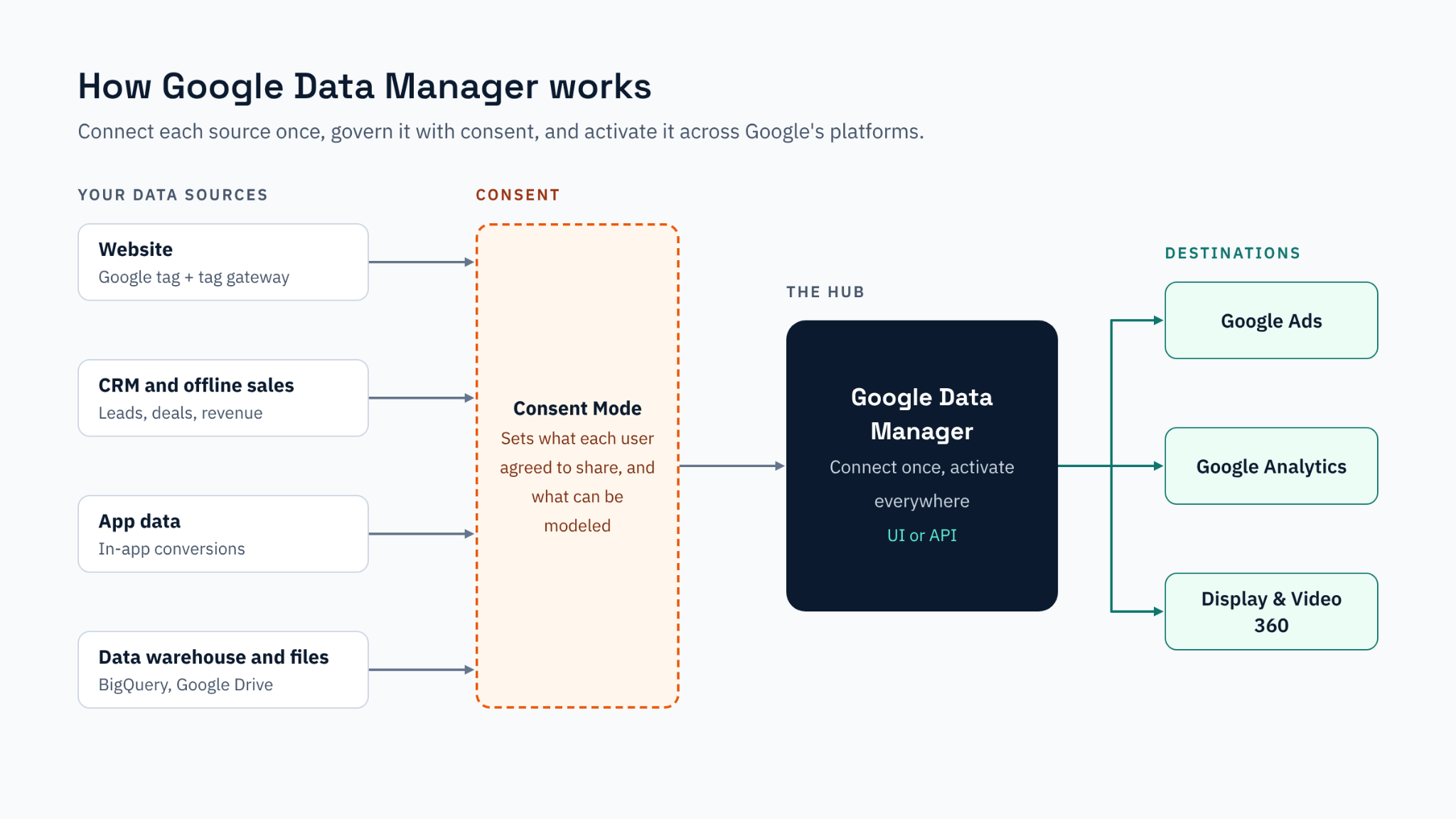
Data Manager is Google’s central environment for importing first-party data and activating it across Google’s advertising and measurement platforms.
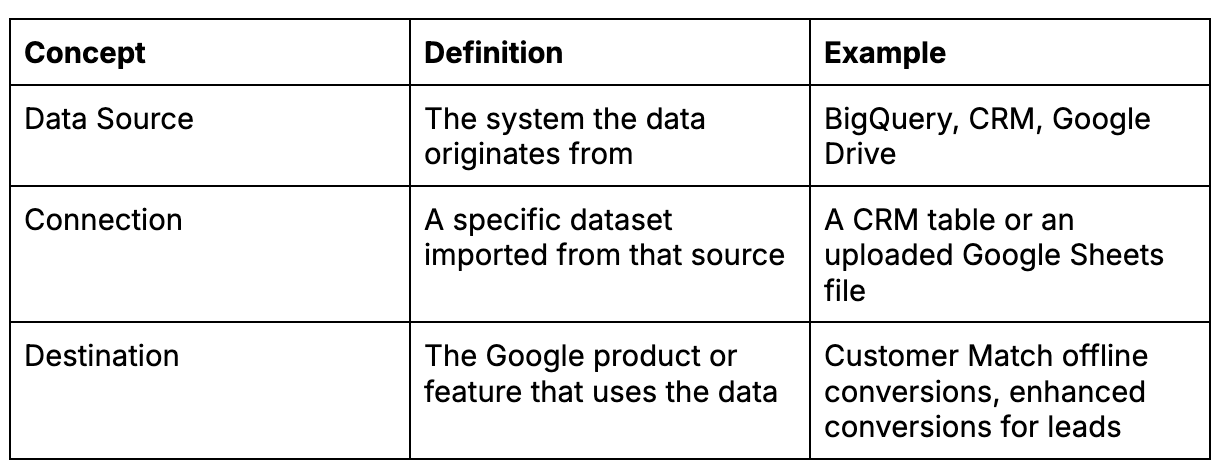
The tool is organized around three concepts:
Data Manager also centralizes Google tag management and consent settings. This has practical implications: consent configuration now sits alongside data activation.
Originally part of Google Ads, Data Manager is now being integrated into Google Analytics, Display and Video 360 and Campaign Manager 360. Organizations are now able to import first-party data once and utilize it across the wider Google Marketing Platform ecosystem.
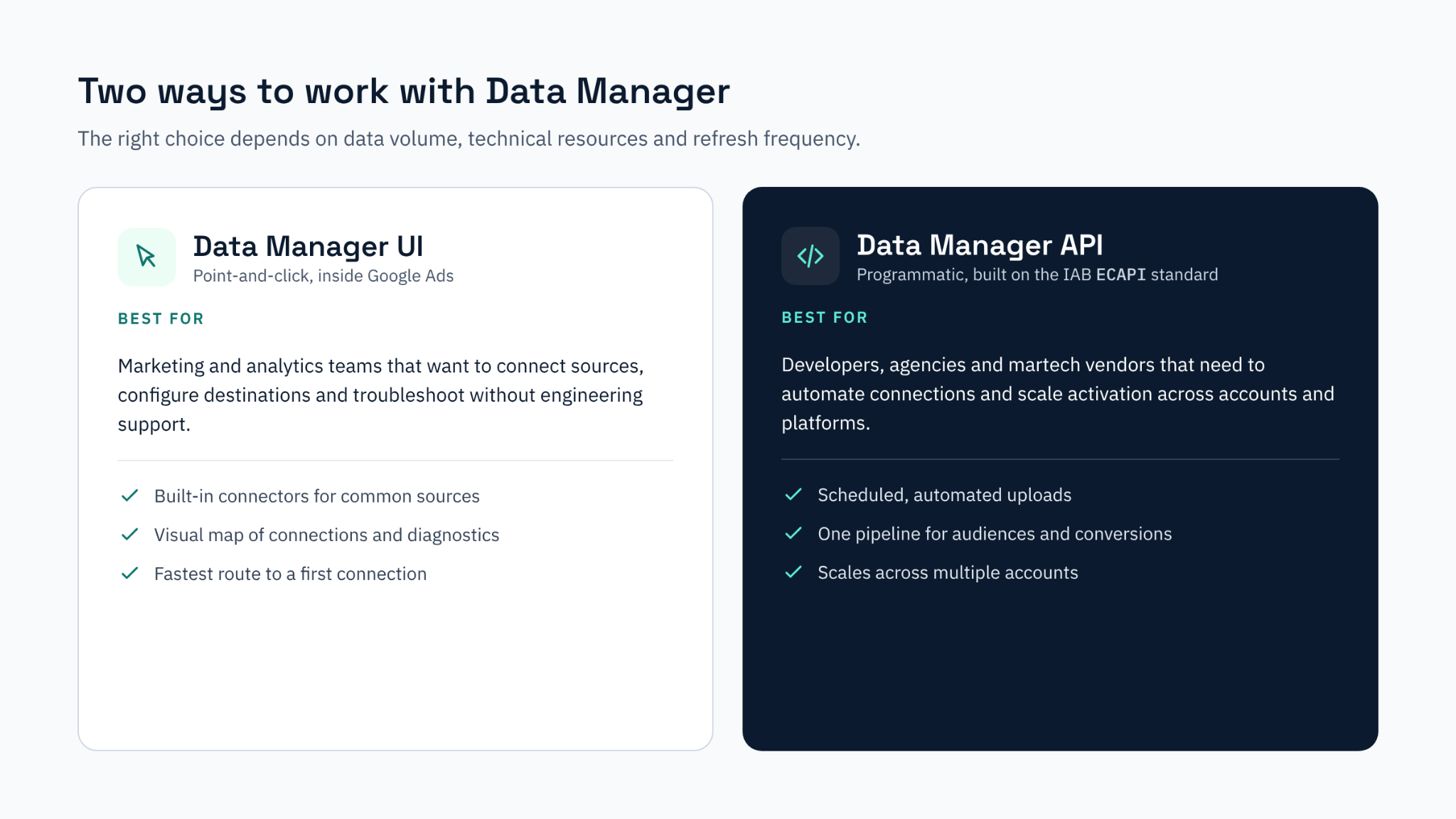
As highlighted during the webinar, organizations can work with Data Manager in two ways:
The Data Manager UI. A point-and-click interface within Google Ads, suited to marketing and analytics teams that want to connect sources, configure destinations and troubleshoot connections without engineering or dev support.
The Data Manager API. A programmatic option for developers, agencies and marketing technology vendors that need to automate data connections, schedule uploads and scale activation across multiple accounts and platforms.
The right choice depends on data volume, technical resources and how frequently data needs to be refreshed. Several organizations start with the UI and move to the API as their requirements mature.
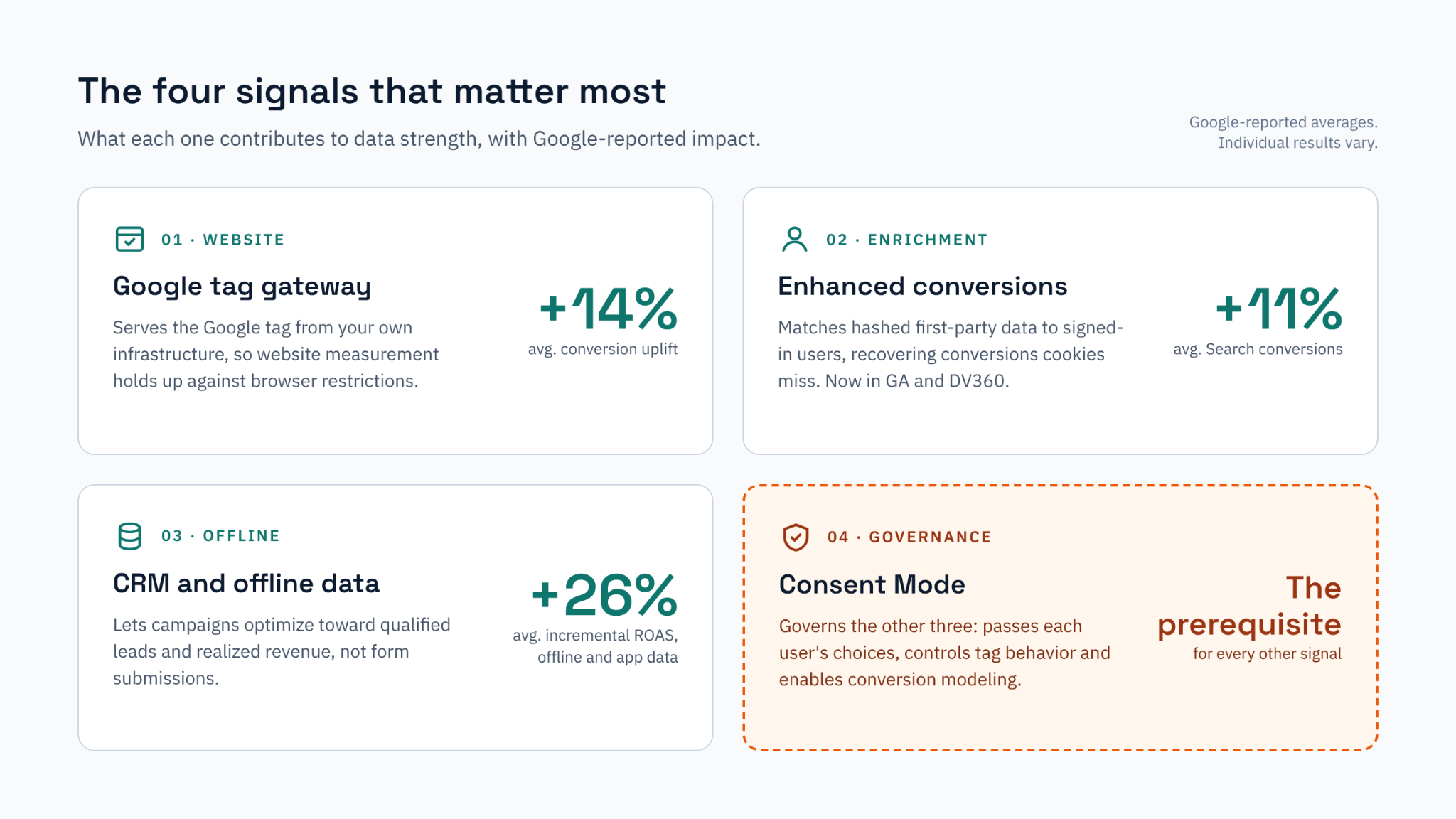
The four signals that matter the most
Website signals: Google Tag Gateway
In a standard implementation, Google tags are served from Google’s domains, which makes them susceptible to browser restrictions and ad blockers. Google Tag Gateway serves Google tags from the advertiser’s own domain, improving the resilience of website measurement. Google reports an average 14% conversion uplift for advertisers using it, rising to more than 20% for Demand Gen campaigns.
Enhanced conversions
Enhanced conversions securely match hashed first-party data, such as email addresses provided by the user (e.g., during checkout), with signed-in Google users. This recovers conversions that cookie-based measurement cannot attribute. Google reports an average 11% increase in Search conversions compared with standard conversion imports.
Offline and CRM data
For lead generation and for organizations that complete sales offline, the most valuable conversions rarely occur on the website. Integrating CRM and offline sales data allows campaigns to optimize toward qualified leads and realized revenue rather than form submissions. Google reports that advertisers who connect offline and app data to Data Manager achieve an average 26% increase in incremental ROAS.
Consent Mode
Consent Mode governs the effectiveness of all three above. It communicates each user’s consent choices to Google, determines tag behavior, and enables conversion modeling where data cannot be observed. An incorrect configuration limits the value of every other signal.
Recent updates from Google
In addition to the Google Analytics and DV360 integration, Google has announced several further developments:
A universal Data Manager API. Based on the IAB Tech Lab’s Event and Conversions API (ECAPI) standard, it provides a single, secure pipeline for audience and conversion data across advertising platforms.
Built-in diagnostics. Data Manager now identifies data issues before they affect campaign performance.
A Data Strength Uplift metric in Google Ads. This metric estimates the additional conversions recovered through an advertiser’s first-party data setup, providing a platform-level measure of the value of measurement investment.
Meridian and GeoX. Google’s open-source marketing mix model now includes agentic capabilities and brand signals, and GeoX geo-experiments are publicly available for incrementality testing.
Common implementation gaps
Adding data sources alone does not resolve weak signals. Across our GA4, Google Tag Manager and Consent audits, four issues recur frequently:
Consent configuration limits signal quality. We frequently identify incorrect default consent stages, tags that fire before a user has made a choice, or CMPs that do not pass the ad_user_data and ad_personalization parameters. These issues are rarely visible in day-to-day reporting, yet they restrict enhanced conversions and conversion modeling.
Conversion data does not reflect business value. Duplicate conversion actions, primary goals that do not align with commercial outputs, and missing or inaccurate transaction values all distort the organization’s data imports. The algorithm optimizes to the data it receives, regardless of whether that data is accurate or reflects business priorities.
User-provided data is inconsistently available. Enhanced conversions for web depend on email addresses and phone numbers being present and correctly formatted at the point of conversion. Without a well-implemented Data Layer, match rates decline, often without a clear diagnosis.
Offline data imports lack ownership. Field mappings change, upload schedules break, and match rates decline over time. Without clear ownership, accountability and monitoring, campaigns can lose weeks of learning before the issue is identified.
Data Manager cannot resolve these issues on its own. They can only be addressed through a sound measurement foundation.
Recommended approach
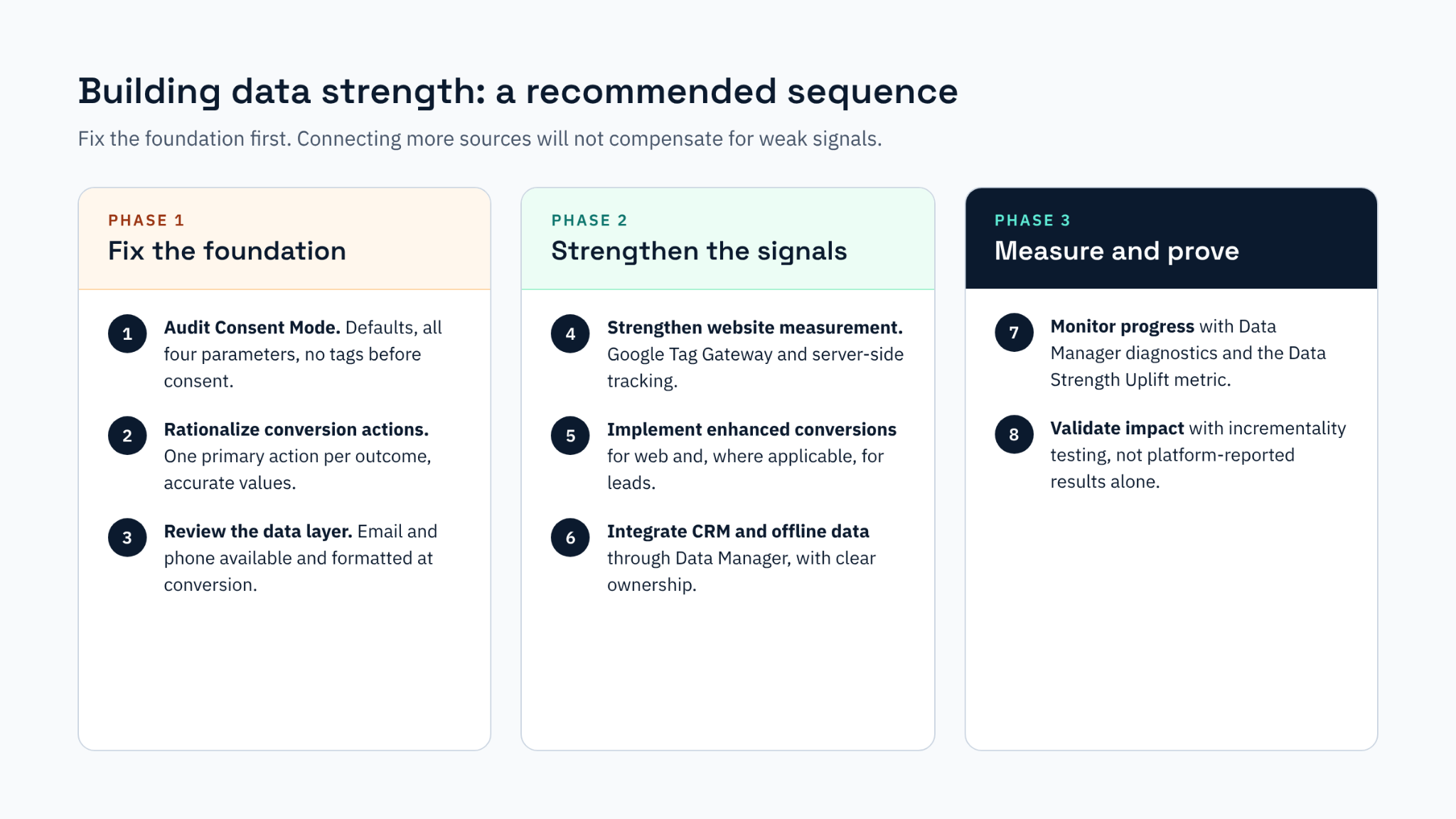
For organizations planning to start using or expand their use of Data Manager, we recommend addressing the following steps:
Audit Consent Mode v2. Verify default states, confirm that all consent parameters are passed, and ensure no tags fire before consent is given.
Prioritize conversion actions. Define one primary conversion per business outcome, remove duplicates, and pass accurate conversion values.
Review the Data Layer. Confirm that email addresses and phone numbers are available and correctly formatted at the point of conversion.
Strengthen website measurement. Implement Google Tag Gateway and set up server-side tracking.
Implement enhanced conversions for web and, where applicable, for leads.
Integrate CRM and offline data through Data Manager, with clear ownership of match rates and upload health and frequency.
Monitor progress using Data Manager diagnostics and the Data Strength Uplift metric, measured against an agreed baseline.
Validate impact through incrementality testing rather than relying solely on platform-reported results.
All performance figures are Google-reported averages. Individual results will vary.
Why not check out our Case Study where we detail how we used Google Data Manager to close a data gap and link offline sales to online data, for cycling gear brand Rapha.